
Online HRV design — plan your installation
Place vents, calculate airflow and plan duct routes. Ventiar is an online tool for installers and people installing heat recovery ventilation themselves — for a client or in their own home.
Create a layout without an accountView a sample PDF reportCreating a layout is free. Saving requires an account. Calculations and your project report are paid features.
See what you can create
From room layout to report
Recreate your rooms in the editor and enter their parameters. After paying for the project, run calculations, review the proposed layout and download the results. Below are two pages from the same Ventiar report: a synthetic three-room layout, not a customer project or a complete house design. Results require technical review before installation.
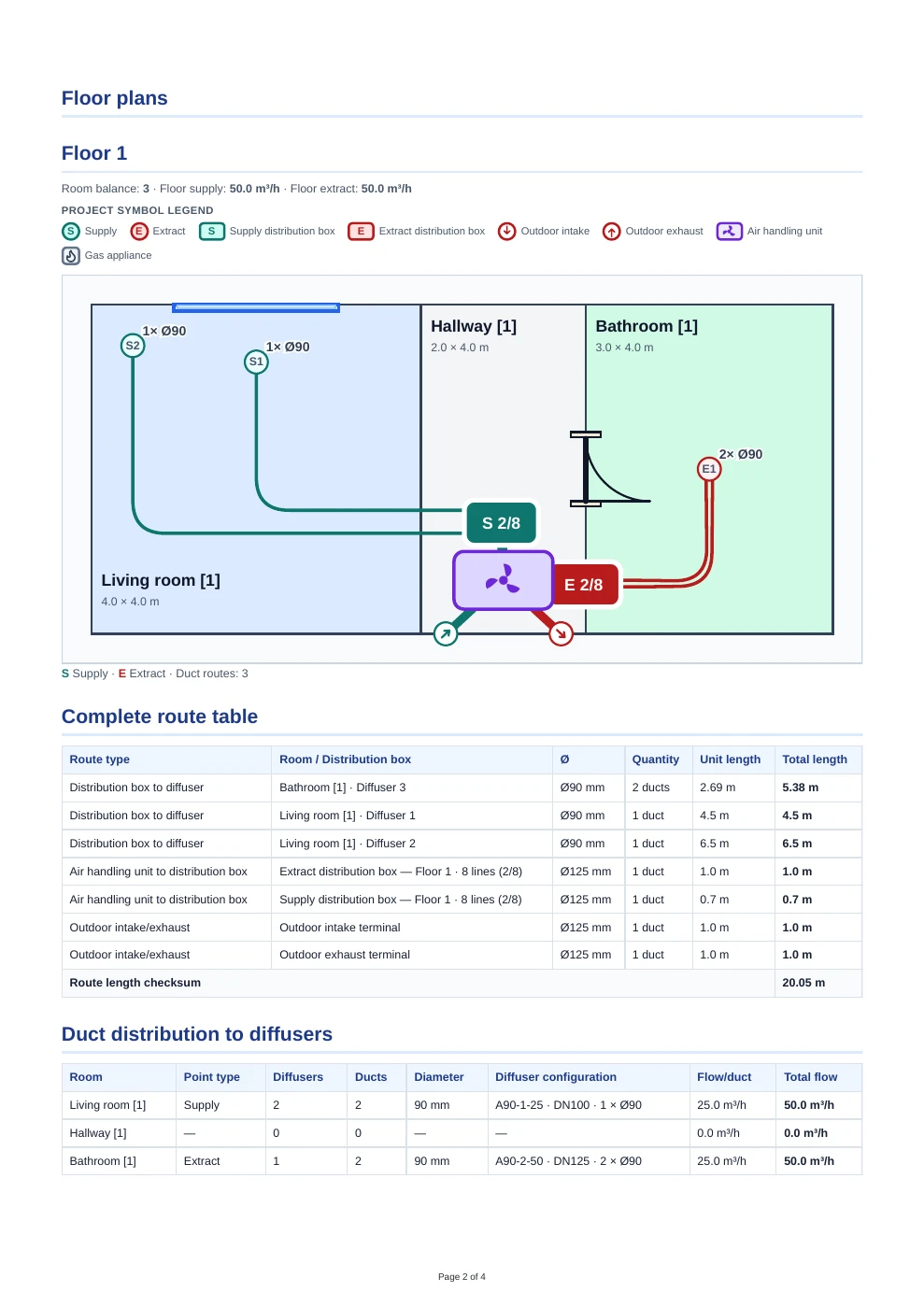
Floor plan from the sample report
Review supply and extract points, duct routes and the airflow summary. Compare the proposed layout with the installation conditions in the building.
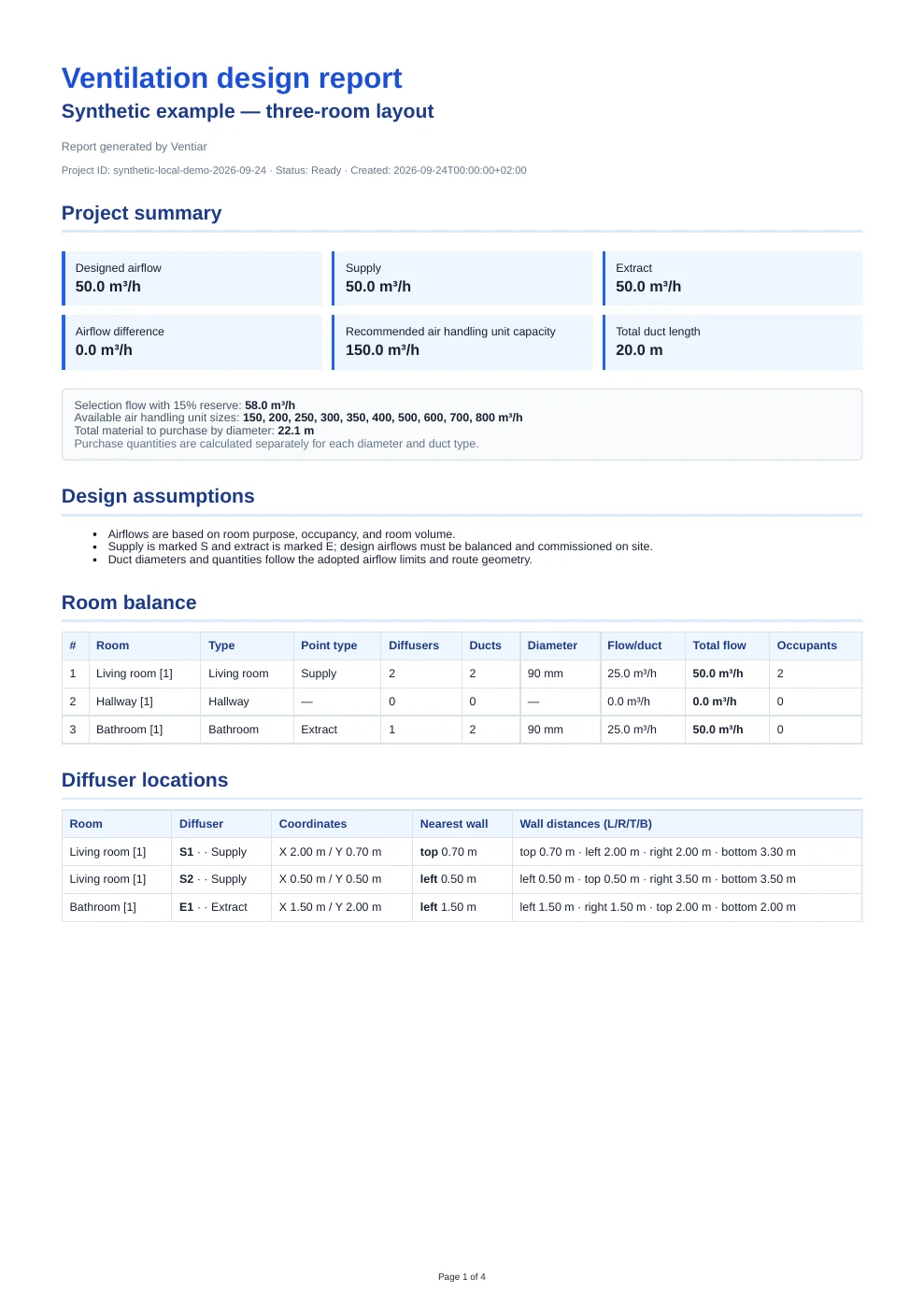
A report for your next steps
Explore the document structure, tables and drawings. These previews contain sample data; your project results depend on the layout and parameters you enter.
Open the full sample PDF reportWhat you get
- room layout and building parameters
- automatic vent placement
- airflow optimization
- duct routing and exportable results
What does the design include?
The design includes room data, airflow calculations, suggested supply and extract points, and support for planning ventilation duct routes.
Who is Ventiar for?
As an installer, you can prepare a layout for a client and organize the results for installation planning. If you are fitting ventilation in your own home, you can recreate the rooms and review the proposed duct routes yourself.
What should you prepare for an HRV design?
Before you start, prepare a floor plan or sketch, room dimensions and heights, room uses and the expected number of occupants. Mark doors, windows, sloping ceilings, beams and available duct space. More accurate input makes it easier to review the installation concept before work begins.
What is included in a Ventiar report?
The report organizes the project data, airflow values, ventilation point locations and suggested duct routes. You can use it as material for further coordination with an installer. Before installation, results should be checked against the actual building conditions and selected equipment.
What should you prepare before starting?
Start with the building data. Use your floor plan as a reference when manually recreating rooms in the editor.
- A floor plan or sketch with dimensions and separate floors.
- Room heights, room uses and expected occupancy.
- Window and door positions, and areas where vents cannot be placed.
- The proposed air handling unit location and duct routing constraints, such as beams and available ceiling space.
What is free and what do you pay for?
You can start creating a room layout for free without an account. Saving the project requires an account.
Paying for the selected project unlocks automatic vent placement, airflow calculations, duct routing and access to the report. Prepare your layout first, then decide whether to pay.
View project prices and available packagesHow does the design workflow work?
- 1Create the room layout and enter dimensions, heights, room uses and occupancy.
- 2Mark windows, doors, no-vent zones and the air handling unit location.
- 3Save the layout to your account and pay for the selected project to run calculations.
- 4Review airflow, vent positions, routes and warnings. Download the report and plan the installation.
Example use case
Working on a home with a living room, bedrooms, a kitchen and a bathroom? Add the rooms to match the floor plan, enter their parameters and assign their uses. After running the calculations, review the proposed vents and routes. Download the report to organize the results for installation planning.
What should you check before installation?
Ventiar supports layout planning and calculations based on your input data. Check that they match the actual building, available duct routes, service access and selected equipment. Review any warnings in the results. The report alone does not validate every construction detail: equipment selection, pressure losses and noise need to be assessed for the specific installation by someone with the appropriate expertise.
Simple project-based pricing
Create your project first and pay only for the layout you want to process.
PRO
For installers and companies preparing multiple heat-recovery ventilation projects.
- Up to 10 HRV projects
- 20 recalculations per project
- All features of the single-project package
- No subscription or automatic renewal
Create the project before payment. Payment unlocks design features for that specific layout.
Frequently asked questions
Can I start without an account?
Yes. You can create a room layout for free without registering. An account is required to save the project, and payment unlocks calculations and the report.
What does paying for a project unlock?
Automatic vent placement, airflow calculations, duct routing and a report for the selected project. Results depend on your input data and need to be checked before installation.
Do I need to install software or know CAD?
No. You create the room layout in a browser-based editor. Prepare the building dimensions and data; use your floor plan as a reference when recreating the rooms.
Is Ventiar for installers and people doing their own installation?
Yes. The tool helps plan layouts for client projects and installations in your own home. The person carrying out the installation remains responsible for assessing site conditions and workmanship.
Is it a subscription?
No. A single project is a one-time purchase. Current prices and package details are listed on this page.
Can I see a report before buying?
Yes. A free sample PDF report is available on this page. Review its structure and the types of results before paying for your own project.