
Getting started with Ventiar
What to prepare for an HRV project: data and dimensions
The Ventiar team
Published: · Updated:
Want to plan heat recovery ventilation for your home? With Ventiar, you can get started yourself, even if you have never used design software before. Begin by adding your first room. Build your layout in the browser, then let the app help you move on to ventilation points and duct routes.
What should you have ready before opening the editor?
Prepare a floor plan or your own sketch with dimensions. It should let you check the size and position of each room. Mark which measurements are confirmed and which still need checking.
Use this checklist to organize your information before working in the editor and discussing the installation.
- A floor plan or sketch showing rooms, doors and windows.
- Room dimensions and ceiling heights recorded in consistent units.
- The use of each room, such as living room, bedroom, kitchen or bathroom.
- The expected number of occupants and how the rooms will be used.
- Building constraints, including beams, sloping ceilings and space available for ducts.
Check your inputs before running calculations
Compare room areas with the floor plan and check units and ceiling heights. Mark missing measurements instead of guessing. Use the plan as a reference when recreating rooms manually; do not assume automatic import.
Separate measured inputs from decisions that need agreement: the unit location, structural penetrations and duct space. Calculations and your own project report are paid features, and results need checking before installation.
1. Open the editor and try it without signing up
The easiest way to get to know Ventiar is to create something of your own. Open the editor and add your first room, such as the living room. You can start building your home layout straight away, without creating an account.
Start with one room, then add the others. You learn how the app works as you build your own layout. You will need an account when you want to save the project to your account and move on to calculations.
2. Show the app how your home is laid out
Add rooms, enter their dimensions and choose their uses: living room, bedroom, kitchen or bathroom. If you have a floor plan, keep it nearby as a reference while recreating the layout.
You work on a visual plan and can see each room as you add it. Knowing your own home is enough to get started. Learn the editor step by step as you fill in the remaining rooms.
3. Let Ventiar handle the calculations
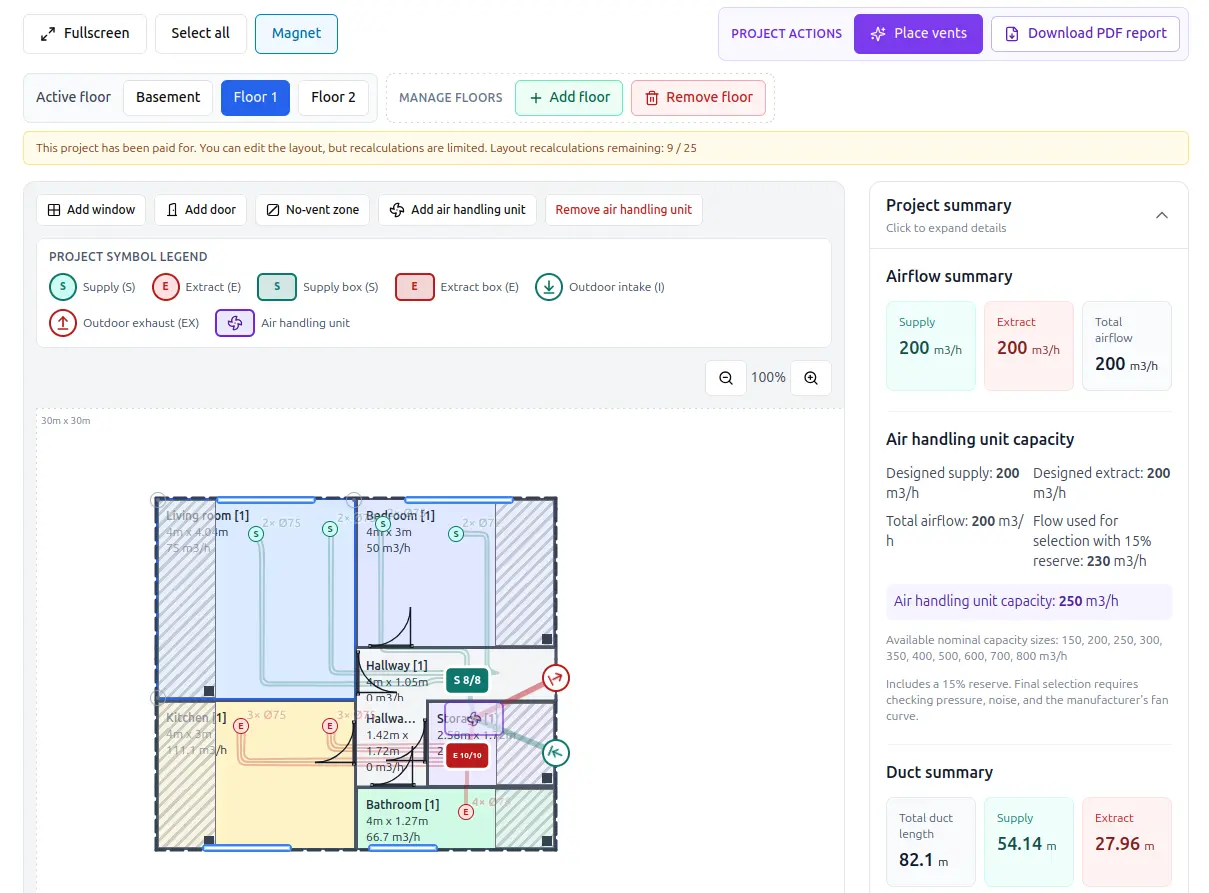
When your layout is ready, save the project to your account. Paying for the selected project unlocks automatic placement of supply and extract vents, airflow optimization and duct routing.
This is where the app helps with the technical work. Ventiar uses the layout you entered to suggest where the installation elements should go. You can view the result on your home plan, making it easier to understand where the ducts run and where the ventilation points are located.
4. Take one small step to get started
For example, your sketch shows a rectangular living room measuring 5 × 4 m and two bedrooms measuring 3 × 4 m each. Add these three rooms, enter their dimensions and position them to match the floor plan. Check the areas: the living room is 20 m² and each bedroom is 12 m². These are practice measurements; use actual dimensions for your own project.
Anyone can give it a try, including homeowners with no design experience. Open the editor and add your first room. That is enough to take the first step and explore what Ventiar can do.